
IGoogle is right around the corner from announcing the next version of Android, it looks like the ASUS K009 may be the hardware that accompanies that release.
Android News and Updates on android applications and games. So get ready heat up your device for more charge. Get all related to android.
Pages
Labels
- Android Apps (21)
- Android Gadgets (17)
- Android Hacks (4)
- Android News (23)
- Games (14)
- Reviews (10)
- updates (9)
Saturday, October 12, 2013
Download Mortal Kombat 3 for android
Wednesday, September 11, 2013
Tuesday, September 10, 2013
Rovio Showcases Latest Angry Birds Star Wars II Crew: Yoda, Qui-Gon Jinn and More
As the big day (September 19th) for Angry Birds Star Wars II fans draws closer, Rovio Entertainment is pumping up the excitement by showing off the game’s characters on their YouTube Channel. For those who missed out on earlier reveals, we have so far seen Emperor Palpatine, shape shifter Zam Wesell, double laser shooter TIE Fighter Pilot, battle droid Droideka, the infamous Jar Jar Binks, purple lightsaber wielding Mace Windu, pink multi-beam blaster wielding Padme Amidala; a younger version of Obi-Wan Kenobi as well as two new versions of Luke Skywalker.
Thursday, July 4, 2013
Best Android smartphones under Rs. 10,000 (July 2013)
If you are on a tight budget and are looking for an entry-level smartphone running the Android OS, here are five options for you to consider under the price point of Rs. 10,000
If you have a budget of Rs. 10,000, and are looking to pick up a smartphone running Android, you are in luck. Today, we have smartphones in the sub-Rs. 10,000 price point that not only boast of a good build, but enough power under the hood as well to take on the apps from the app store.
APP Review :Best Photo Apps For iOS And Android Tablets
4904
The large screen size and high resolution of tablets make them great choices for editing your images.
The road to creating a captivating image doesn’t end once you press the shutter button. Exposure, contrast and color balance adjustments can go a long way towards communicating your photographic vision. And while smartphones are perfectly sized fortaking photos on the go, the much larger screen area of tablets makes them a great choice for perfecting your images after the fact, whether they’ve been shot with a phone or a dedicated camera. All you need is the right app. Here’s a look at the best tablet photo editing apps for iOS and Android, offering features and controls that rival, and in some cases even exceed the capabilities of entry-level desktop software.
Magic Media i5 Android Handheld Games Console Unveiled
A new Android handheld games console has been unveiled this week in the form of the Magic Media i5 which has been created by China manufacturer MediaTek, who has equipped with console with a quad-core processor.
The Magic Media i5 id fitted with a 5 inch, 1280 x 720 pixel IPS display, and powered by a 1.2 GHz ARM Cortex-A7 processor supported by 1GB of RAM and runs Google’s latest Android 4.2.2 Jelly Bean operating system.
Friday, June 21, 2013
Enable Text Expansion in the Stock Google Keyboard
Technically, the feature is hidden under "Personal dictionary." Here you can enter your own terms, as well as find the ones you've already added. When you edit/create a new word or phrase, though, you have the option to create a shortcut. Once you set up the shortcut, your expanded words will appear as autocorrect suggestions as you type the shortcut phrase.
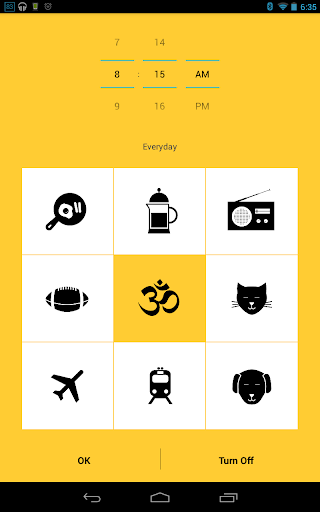
Warmly Wakes You Up Gently, Encourages Better Sleep Hygiene
watch this video for full walkthrough app's features, it's just a bit long. You can select the wake-up sound you want, whether it's the sound of frying eggs and breakfast being made, brewing coffee, a bustling airport, or a simple morning meditation. Five minutes before you're supposed to be up, the alarm will start playing your sound from really low volume, and slowly ramp it up until you hear it, turn off the alarm, and get up. It'll even get the local weather and temperature for you.
It's worth noting that the app doesn't have multi-day alarms, either: the goal is to promote good sleep hygeine by waking up at the same time every day—a tip we've mentioned before. You can snooze the alarm, if you must. Plus, the alarm features an auto-off after 15 minutes, so if you forget it and aren't around to turn it off, your neighbors or roommates won't hate you when you get back. Warmly is $2 at Google Play.
Warmly ($2) | Google Play
Sunset Lets You Use Your Phone Without Losing Your Night Vision
Android: If you're stargazing at night, or just somewhere dark and you don't want to be blinded by using your phone, Sunset for Android is a simple screen filter that applies a reddish overtone to your display so you won't lose your night vision.
PureContact Is a Visual, Swipe-Driven Speed Dialer for Android
Android: Most Android phones have some kind of speed dialer, whether it's a "favorites" tab in the dialer app or programmable contact buttons, but PureContact steps in and adds some useful gestures that make calling, texting, emailing, or using another app to stay in touch with friends super easy.
Wallaby Tells You the Best Credit Card to Use Wherever You're Shopping
Android/iOS/Web: Swiping the wrong credit card could mean missing out on valuable rewards, points, or cash back. Wallaby makes sure that doesn't happen to you by telling you which card in your wallet is the best one to use, for any location you're shopping or dining at.Like webapp Reward Boost, the mobile Wallaby apps only require you to choose the cards you own; your credit card numbers aren't needed. You can then see a list of places around you (powered by Foursquare) and tap any of them to get the recommended card to use for that location. It even works with cards that have rotating cash back categories (which can be hard to keep track of). I cycle between four and five credit cards, depending on the location type, and Wallaby correctly identified the ones with the highest rewards across groceries, gas, restaurants, pharmacy, and general shopping.
Earbits Offers Fast, Completely Free Streaming Music
On your Android device, Earbits will scan your device for music and load up blended channels and radio stations that combine your music with the free songs that Earbits has to offer. On the web, you just click "Listen to Editor's Picks" or "Browse Channels" to start the music, no questions, no sign-ups (unless you want to save your preferences), no hassle. Browsing channels takes you to a tiled selection of genres, each with their own subgenres that you can select to further narrow the songs Earbits plays for you, but at most it's two or three clicks before the music starts flowing.
From there, Earbits works like some of the other great, underrated music services we've mentioned—your play history is in the sidebar, you can favorite songs to make note of them, and you can sign up for an artist's mailing list, like their Facebook page, or otherwise connect with them right from the song you're listening to. When you do, you earn "Groovies," a currency that lets you play specific songs whenever you like, bypassing the radio feature. Best of all, Earbits is completely free.
Hit the link below to try it out, or grab the Android app from Google Play. When I tested it out, I found the Android app was particularly useful at generating blended stations that fit all of my music tastes together in one. It helps that the Android app is really good looking, too.
CPU-Z Tells You Everything About Your Phone's CPU, Battery, and More
Android: Getting detailed information about your device isn't always easy. Apps like Speccy help on the desktop, and now CPU-Z can do the same for your phone or tablet.
The app requires Android 3.0 and above (sorry Gingerbread users). Once installed it will give you extensive information about your device, including display resolution, SoC architecture, active RAM usage, battery health, temperature, and a ton more. In most cases, this app will probably be overkill, but if you've ever needed to know what kernel architecture your device uses, CPU-Z has your back.
CPU-Z comes to Android | NirmalTV
Greenify Auto-Hibernates Apps You're Not Using to Save Battery
Android (Rooted): If your battery won't make it through the day, Greenify is a handy utility that will automatically hibernate battery hogging apps that linger in the background after you're finished using them. We tried it out, and it works like a charm
Friday, May 17, 2013
New Android version releasing on June 10th?
While everyone was desperately waiting for the moment when the new Android version 4.3 would be announced at the Google I/O Developer Conference, that moment never came, but it seems that is not the end. It has just been moved further to a later date.
World War Z Game Launching on iOS and Android Devices
Thursday, May 16, 2013
Top 7 Apps To Earn Money With Your Android Device
So you just got a shiny new Android phone or tablet over the holidays. You’ve already run through the “must have” apps lists out there and you’re looking for something new. Or maybe you’re a long time user and just looking to earn a bit of side money or a Google Play gift card. We’ve rounded up a handful of apps where you can earn real money or other rewards doing simple activities on your Android phone or tablet.
Money making apps fall into a few basic categories, and there’s often crossover between the various apps. Pay-Per-Install are exactly what it sounds like, you get paid to install sponsored apps. Shopping apps are intended to work in conjunction with your shopping trips when you’re already out and about, they’re often GPS depended, so don’t think you can earn from your couch. Video apps pay you for watching videos, and most of these apps tend to have some video component. And lastly, for lack of a better description, there are apps where you perform “tasks” for points, which could be anything from liking a page on Facebook to registering for a website or taking a survey.
Subscribe to:
Posts (Atom)